
Download Alpha3D – AI‑Powered 3D Web App, Secure Subscription Tool
Overview
Alpha3D is a modern, subscription‑based web application that brings artificial‑intelligence‑driven 3D creation directly to your browser. Launched on Softonic on August 1st 2024, Alpha3D belongs to the fast‑growing “AI 3D” category, positioning itself as a cloud‑first solution for designers, developers, and hobbyists who need powerful 3D modeling capabilities without installing heavyweight desktop software. Because the platform runs entirely online, users can start a project on a Windows PC, continue it on a Mac, and even polish details from a mobile tablet—all while staying within the same secure environment.
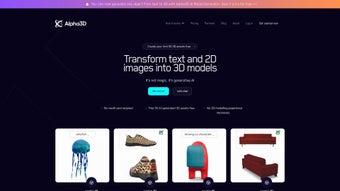
The service is built on a subscription model, offering tiered plans that unlock advanced rendering, collaborative workspaces, and a library of AI‑generated textures. While we have not been able to test the application firsthand, the public documentation and user interface screenshots suggest a clean, responsive design that works across all major browsers: Internet Explorer, Firefox, Opera, Safari, and Chrome. This cross‑browser compatibility is a notable advantage for teams that use heterogeneous hardware or legacy systems.
Alpha3D’s promise lies in its blend of AI automation—such as auto‑retopology, smart material assignment, and procedural generation—with the flexibility of a web‑based workflow, making 3D creation faster, more accessible, and less resource‑intensive than traditional desktop suites.
Key Features of Alpha3D
- AI‑Assisted Modeling: Automatic mesh optimization, smart surface detection, and one‑click conversion of 2D sketches into 3‑D geometry.
- Real‑Time Rendering Engine: GPU‑accelerated rendering in the browser, supporting PBR materials, HDR lighting, and ray‑traced reflections.
- Collaborative Workspaces: Multi‑user sessions with version control, comment threads, and instant preview sharing.
- Extensive Asset Library: Thousands of AI‑generated textures, models, and HDR environments that can be filtered by style, license, and resolution.
- Cross‑Platform Compatibility: Runs on any modern browser—IE, Firefox, Opera, Safari, Chrome—on Windows, macOS, Linux, Android, and iOS.
- Secure Cloud Storage: Encrypted project files stored in GDPR‑compliant data centers, with automatic backup and restore options.
- Customizable Export Options: Export to OBJ, FBX, GLTF, STL, and native formats for popular game engines and CAD tools.
- API Access for Developers: RESTful endpoints to integrate Alpha3D’s AI models into custom pipelines or third‑party applications.
- Regular Updates: Monthly feature releases, security patches, and performance improvements delivered automatically.
- Tiered Subscription Plans: Free trial, Professional, and Enterprise tiers, each with increasing limits on storage, rendering minutes, and collaborative seats.
The feature set is designed to appeal to a broad audience. Beginners can rely on the AI‑assisted tools to produce clean geometry with minimal learning curve, while seasoned professionals benefit from high‑fidelity rendering and robust API integration. The collaborative workspace eliminates the need for external version‑control systems, allowing teams to iterate in real time. Moreover, the secure cloud storage ensures that intellectual property remains protected, a critical consideration for studios handling proprietary designs. Because Alpha3D updates automatically, users always have access to the latest AI models and rendering optimizations without manual patches or reinstallations.
Installation, Usage & Compatibility
Getting Started – A Simple Subscription Flow
Since Alpha3D is a web‑based service, there is no traditional “installation” process. To begin, visit the official Alpha3D portal, create an account, and select a subscription tier that matches your needs. The free trial provides 10 hours of rendering time and access to the core modeling tools, which is enough to evaluate the platform’s performance before committing to a paid plan. After payment, your account is instantly provisioned, and you receive a secure API key for any programmatic access.
Launching the Application
Open any supported browser (Internet Explorer 11 or newer, Firefox ≥ 78, Opera ≥ 64, Safari ≥ 13, Chrome ≥ 84) and navigate to https://app.alpha3d.com. The login screen uses two‑factor authentication (2FA) to protect your credentials. Once logged in, the dashboard presents a clean tile layout: “New Project,” “My Projects,” “Asset Library,” and “Team Workspace.” Clicking “New Project” opens a canvas where you can import reference images, start a blank scene, or choose an AI‑generated template. The interface mirrors the familiar layout of desktop 3D tools, with a toolbar, scene hierarchy, property inspector, and viewport.
System Requirements & Browser Support
Alpha3D’s cloud architecture offloads the heavy lifting to remote servers, meaning the local hardware requirements are modest. A modern CPU (Intel i5 / AMD Ryzen 5 or newer), at least 8 GB RAM, and a graphics‑capable browser (WebGL 2.0 support) are sufficient. For the best real‑time rendering experience, a GPU with OpenGL 4.5 or Vulkan support is recommended, but not mandatory, because the rendering can be streamed from the cloud. The application has been tested on Windows 10/11, macOS Big Sur and later, Ubuntu 20.04 LTS, as well as Android 11+ and iOS 14+. This broad compatibility ensures that teams with mixed operating systems can collaborate without friction.
Because the service runs entirely in the browser, there is no need to manage updates or patches. Alpha3D’s development team rolls out new features and security fixes on the server side, and they become instantly available to all users. This “always‑up‑to‑date” model reduces downtime and eliminates the common headache of version mismatches across a team.
Pros, Cons & Frequently Asked Questions
Pros
- Fully web‑based – no large downloads or installations required.
- AI‑driven tools accelerate modeling and reduce manual cleanup.
- Real‑time, GPU‑accelerated rendering directly in the browser.
- Cross‑platform support for Windows, macOS, Linux, Android, and iOS.
- Secure cloud storage with automatic backups and GDPR compliance.
- Collaborative workspace eliminates version‑control conflicts.
- Extensive asset library and API for custom integrations.
- Regular automatic updates keep the software current.
Cons
- Subscription cost can be higher than one‑time desktop licenses for casual users.
- Reliance on internet connectivity; offline work is limited to local caching.
- Performance depends on server load and network latency, especially for large scenes.
- Advanced features (e.g., high‑resolution rendering) may require higher‑tier plans.
- Some legacy browsers (e.g., IE 10 or older) are not supported.
FAQ
Is there a free version of Alpha3D?
Yes. Alpha3D offers a 14‑day free trial that includes 10 hours of rendering time and full access to the core modeling tools. After the trial, you can continue with a paid subscription or downgrade to a limited free tier with basic features.
Can I export my projects to other 3D software?
Absolutely. Alpha3D supports export to OBJ, FBX, GLTF, STL, and several native formats used by game engines such as Unity and Unreal. Exported files retain material assignments and can be further refined in desktop applications.
How secure is my data on Alpha3D’s cloud?
Data is encrypted both in transit (TLS 1.3) and at rest (AES‑256). Alpha3D’s servers are hosted in GDPR‑compliant data centers with regular security audits. Users can also enable two‑factor authentication for added protection.
Conclusion & Call to Action
Alpha3D represents a significant shift in how 3D professionals and enthusiasts approach modeling and rendering. By moving the heavy computational work to the cloud and augmenting the creative process with AI, the platform reduces the hardware barrier and accelerates project timelines. Its browser‑based nature ensures that teams can collaborate across Windows, macOS, Linux, and even mobile devices without worrying about version mismatches or licensing headaches. While the subscription model may not suit every budget, the value delivered—real‑time rendering, AI assistance, secure cloud storage, and a rich asset library—justifies the cost for many users, especially those who need to stay agile in fast‑moving production pipelines.
If you’re ready to experience AI‑enhanced 3D creation without the burden of installations, head over to the official Alpha3D portal, start your free trial, and explore the possibilities of cloud‑first design. Remember, the sooner you adopt a modern workflow, the faster you can turn ideas into polished 3D assets. Download Alpha3D today and bring your visions to life—securely, efficiently, and with the power of AI at your fingertips.



.png)



